

2019.6.8にSSLを更新しました。RapidSSLからさくら推奨の「JPRS Domain Validation Authority」に変えたところ、途端に403 Forbiddenになりました。その顛末を2回に分けて記述します。
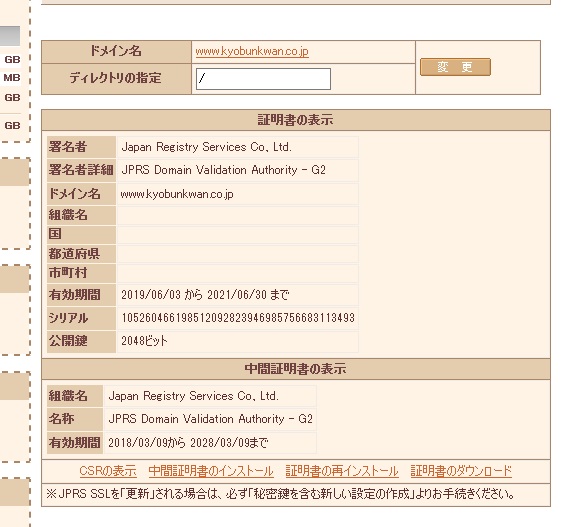
変更は問題なく手続き済ませたはずでした。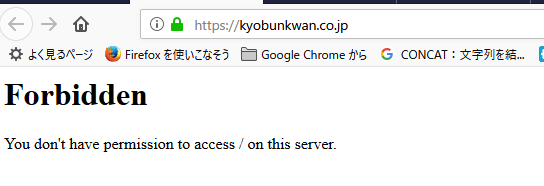
うーん、何が悪かったのかよくわからん。403Forbiddenに。常時SSlなので、サイト全体がこの状態に。仕方がないのでひとまず応急処置でSSLを解除することにしました。.htaccessをいじります。
# BEGIN All In One WP Security プラグインによるセキュリティ設定
#AIOWPS_BLOCK_WP_FILE_ACCESS_START
<Files license.txt>
<IfModule mod_authz_core.c>
Require all denied
</IfModule>
<IfModule !mod_authz_core.c>
Order deny,allow
Deny from all
</IfModule>
</Files>
<Files wp-config-sample.php>
<IfModule mod_authz_core.c>
Require all denied
</IfModule>
<IfModule !mod_authz_core.c>
Order deny,allow
Deny from all
</IfModule>
</Files>
<Files readme.html>
<IfModule mod_authz_core.c>
Require all denied
</IfModule>
<IfModule !mod_authz_core.c>
Order deny,allow
Deny from all
</IfModule>
</Files>
#AIOWPS_BLOCK_WP_FILE_ACCESS_END
#AIOWPS_BASIC_HTACCESS_RULES_START
<Files .htaccess>
<IfModule mod_authz_core.c>
Require all denied
</IfModule>
<IfModule !mod_authz_core.c>
Order deny,allow
Deny from all
</IfModule>
</Files>
ServerSignature Off
LimitRequestBody 10240000
<Files wp-config.php>
<IfModule mod_authz_core.c>
Require all denied
</IfModule>
<IfModule !mod_authz_core.c>
Order deny,allow
Deny from all
</IfModule>
</Files>
#AIOWPS_BASIC_HTACCESS_RULES_END
#AIOWPS_PINGBACK_HTACCESS_RULES_START
<Files xmlrpc.php>
<IfModule mod_authz_core.c>
Require all denied
</IfModule>
<IfModule !mod_authz_core.c>
Order deny,allow
Deny from all
</IfModule>
</Files>
#AIOWPS_PINGBACK_HTACCESS_RULES_END
#AIOWPS_IP_BLACKLIST_START
<IfModule !mod_authz_core.c>
Order allow,deny
Allow from all
Deny from 107.150.95.3
Deny from 107.182.237.18
Deny from 185.156.174.171
Deny from 185.189.113.228
Deny from 185.189.150.56
Deny from 185.204.1.181
Deny from 185.230.124.168
Deny from 185.230.124.172
Deny from 192.171.29.149
Deny from 194.99.104.202
Deny from 194.99.105.184
Deny from 45.64.104.175
Deny from 62.149.29.35
Deny from 62.149.29.38
Deny from 62.149.29.53
Deny from 80.67.8.182
Deny from 89.238.154.235
</IfModule>
<IfModule mod_authz_core.c>
<RequireAll>
Require all granted
Require not ip 107.150.95.3
Require not ip 107.182.237.18
Require not ip 185.156.174.171
Require not ip 185.189.113.228
Require not ip 185.189.150.56
Require not ip 185.204.1.181
Require not ip 185.230.124.168
Require not ip 185.230.124.172
Require not ip 192.171.29.149
Require not ip 194.99.104.202
Require not ip 194.99.105.184
Require not ip 45.64.104.175
Require not ip 62.149.29.35
Require not ip 62.149.29.38
Require not ip 62.149.29.53
Require not ip 80.67.8.182
Require not ip 89.238.154.235
</RequireAll>
</IfModule>
#AIOWPS_IP_BLACKLIST_END
#AIOWPS_BLOCK_SPAMBOTS_START
<IfModule mod_rewrite.c>
RewriteEngine On
RewriteCond %{REQUEST_METHOD} POST
RewriteCond %{REQUEST_URI} ^(.*)?wp-comments-post\.php(.*)$
RewriteCond %{HTTP_REFERER} !^http(s)?://(.*)?\.kyobunkwan\.co\.jp [NC,OR]
RewriteCond %{HTTP_USER_AGENT} ^$
RewriteRule .* http://127.0.0.1 [L]
</IfModule>
#AIOWPS_BLOCK_SPAMBOTS_END
#AIOWPS_PREVENT_IMAGE_HOTLINKS_START
<IfModule mod_rewrite.c>
RewriteEngine On
RewriteCond %{HTTP_REFERER} !^$
RewriteCond %{REQUEST_FILENAME} -f
RewriteCond %{REQUEST_FILENAME} \.(gif|jpe?g?|png)$ [NC]
RewriteCond %{HTTP_REFERER} !^http(s)?://(.*)?\.kyobunkwan\.co\.jp [NC]
RewriteRule \.(gif|jpe?g?|png)$ - [F,NC,L]
</IfModule>
#AIOWPS_PREVENT_IMAGE_HOTLINKS_END
# END All In One WP Security

# BEGIN Force SSL for SAKURA 2019.6.9コメントアウト。常時暗号化時にプラグインを有効化して、記述を戻すこと。
# 常時HTTPS化(HTTPSが無効な場合リダイレクト)
# <IfModule mod_rewrite.c>
# RewriteEngine on
# RewriteCond %{HTTPS} !on
# RewriteRule .* https://%{HTTP_HOST}%{REQUEST_URI} [R=301,L]
# </IfModule>
# END Force SSL for SAKURA

# 強制的に暗号化解除2019.6.9。常時暗号化回復後は削除すること。
<IfModule mod_rewrite.c>
RewriteEngine On
RewriteCond %{HTTPS} on
RewriteRule ^(.*)$ http://%{HTTP_HOST}/$1 [L,R=301]
</IfModule>


DirectoryIndex index.html index.php

RewriteEngine On
RewriteBase /
RewriteRule ^index\.php$ - [L]

RewriteEngine on
RewriteCond %{REQUEST_URI} ^/inquiry/
RewriteCond %{HTTPS} off
RewriteRule ^(.*)$ https://%{HTTP_HOST}%{REQUEST_URI} [R,L]

# uploaded files
RewriteRule ^([_0-9a-zA-Z-]+/)?files/(.+) wp-includes/ms-files.php?file=$2 [L]

# add a trailing slash to /wp-admin
RewriteRule ^([_0-9a-zA-Z-]+/)?wp-admin$ $1wp-admin/ [R=301,L]

RewriteCond %{REQUEST_FILENAME} -f [OR]
RewriteCond %{REQUEST_FILENAME} -d
RewriteRule ^ - [L]
RewriteRule ^([_0-9a-zA-Z-]+/)?(wp-(content|admin|includes).*) $2 [L]
RewriteRule ^([_0-9a-zA-Z-]+/)?(.*\.php)$ $2 [L]
RewriteRule . index.php [L]

DirectoryIndex index.html index.htm index.shtml index.php index.cgi .ht
AuthUserFile /home/kyobunkwan/www/.htpasswd
AuthType Basic
AuthName "Web access"
Satisfy all
Order deny,allow

AddDefaultCharset utf-8

# BEGIN SAKURA Internet Inc.
<IfModule mod_deflate.c>
SetOutputFilter DEFLATE
AddOutputFilterByType DEFLATE text/plain
AddOutputFilterByType DEFLATE text/html
AddOutputFilterByType DEFLATE text/xml
AddOutputFilterByType DEFLATE text/css
AddOutputFilterByType DEFLATE text/javascript
AddOutputFilterByType DEFLATE application/xhtml+xml
AddOutputFilterByType DEFLATE application/xml
AddOutputFilterByType DEFLATE application/rss+xml
AddOutputFilterByType DEFLATE application/atom_xml
AddOutputFilterByType DEFLATE application/javascript
AddOutputFilterByType DEFLATE application/x-javascript
AddOutputFilterByType DEFLATE application/x-httpd-php
AddOutputFilterByType DEFLATE application/x-font-ttf
AddOutputFilterByType DEFLATE application/vnd.ms-fontobject
AddOutputFilterByType DEFLATE font/opentype font/ttf font/eot font/otf
AddOutputFilterByType DEFLATE image/svg+xml
</IfModule>

<ifModule mod_expires.c>
ExpiresActive On
ExpiresDefault "access plus 2 weeks"
ExpiresByType image/gif "access plus 2592000 seconds"
ExpiresByType image/jpg "access plus 2592000 seconds"
ExpiresByType image/jpeg "access plus 2592000 seconds"
ExpiresByType image/png "access plus 2592000 seconds"
ExpiresByType image/x-icon "access plus 2592000 seconds"
ExpiresByType text/html "access plus 1 seconds"
ExpiresByType text/css "access plus 604800 seconds"
ExpiresByType text/javascript "access plus 216000 seconds"
ExpiresByType application/x-javascript "access plus 216000 seconds"
ExpiresByType application/x-shockwave-flash "access plus 216000 seconds"
ExpiresByType application/pdf "access plus 1 weeks"
ExpiresByType application/x-font-opentype "access plus 1 weeks"
ExpiresByType application/x-font-ttf "access plus 1 weeks"
ExpiresByType application/x-font-woff "access plus 1 weeks"
ExpiresByType font/opentype "access plus 2 weeks"
ExpiresByType font/ttf "access plus 2 weeks"
ExpiresByType font/eot "access plus 2 weeks"
ExpiresByType font/otf "access plus 2 weeks"
ExpiresByType video/ogg "access plus 1 month"
ExpiresByType video/mp4 "access plus 1 month"
ExpiresByType video/webm "access plus 1 month"
</ifModule>
# END SAKURA Internet Inc.

FileETag none

# BEGIN WordPress
RewriteRule ^index\.php$ - [L]
# uploaded files
RewriteRule ^([_0-9a-zA-Z-]+/)?files/(.+) wp-includes/ms-files.php?file=$2 [L]
# add a trailing slash to /wp-admin
RewriteRule ^([_0-9a-zA-Z-]+/)?wp-admin$ $1wp-admin/ [R=301,L]
RewriteCond %{REQUEST_FILENAME} -f [OR]
RewriteCond %{REQUEST_FILENAME} -d
RewriteRule ^ - [L]
RewriteRule  ^[_0-9a-zA-Z-]+/(wp-(content|admin|includes).*) $1 [L]
RewriteRule  ^[_0-9a-zA-Z-]+/(.*\.php)$ $1 [L]
RewriteRule . index.php [L]
# END WordPress

<Files "wp-login.php">
order deny,allow
deny from all
allow from 210.170.55.173
allow from 126.217.119.163
allow from 153.216.80.232
</Files>
これと連動してhttpsにリダイレクトする設定になっているところはすべて書き換えます。具体的にはheader.phpの部分にあります。
<?php
/* 出力結果で「https://」で始まる部分を「http://」に変換するようにテーマを修正2019.6.9。不具合解消後は逆にすること*/
   ob_start();
   wp_head();
   $wp_head_contents = ob_get_clean();
   $wp_head_contents = str_replace('https://', 'http://', $wp_head_contents);
   echo($wp_head_contents); ?>
この部分の「https://」「http://」を逆に書き換えること。
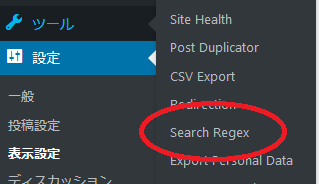
これでとりあえず暗号化による非表示は解消されました。念の為、データベースの記述も「https://」から「http://」に書き換えます。プラグイン「search Regex」を使って一括書き換えします。
ここまでやっても、ぐぐってリンクをたどってくる場合はエラーになっちゃうんですけどね。気休めですね。
その2ではいよいよ403エラー不具合の核心に迫ります。